How to start GTA 3 in your browser
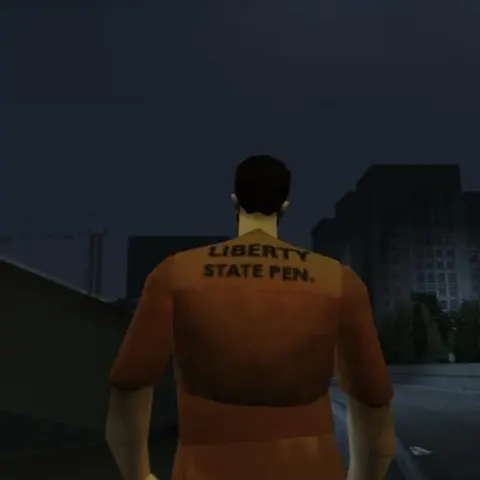
Find Grand Theft Auto III in the Ported 2 Browser game list, press Start on this page, then choose PLAY GAME in the III Web launcher that opens in the game window. The launcher downloads the game data on its own. In our check it fetched about 117 MB before showing Click anywhere to start. Click the window and the GTA III main menu appears. Pick Start Game, then Start New Game. The opening scenes show the prison convoy being ambushed, and you take control next to 8-Ball's car. Press Enter to skip a scene you have already seen.
Desktop launch check · November 24, 2026
We ran this page's launcher in desktop Chromium. No game file had to be supplied to reach the street. After a few minutes of play the page had transferred about 154 MB in total, because radio stations and sound effects keep streaming in while you play. Missions beyond the first drive, audio quality and long sessions were not checked.
Grand Theft Auto III is the 2001 open-world game set in Liberty City. You play Claude, a silent criminal who works his way up through the city's gangs, stealing cars and taking missions from a growing list of contacts.
Keyboard controls
This port keeps GTA III's classic PC controls. In our check, W walked forward and S walked back. Enter put Claude into the Kuruma beside him, and W drove it forward. The game's own tutorial boxes name other keys when you first need them. One tells you to press Down or S to brake or reverse. Another lists Right Ctrl, Space or the right mouse button for the handbrake. In the menus, moving the mouse over an item highlighted it.
If the main menu does not react, click inside the game window and press Enter again, holding it for a moment. Use the Fullscreen button under the player for a larger view. Controllers have not been tested yet.
On a phone or tablet
We have not tested touch play for this build yet. Expect a first download of more than 100 MB, so a Wi-Fi connection is the safer choice.
Saving your progress
The launcher's start page has a Save Manager next to PLAY GAME. It holds eight slots, and each slot has Upload, Set 100%, Download and Delete buttons. A Wipe Database button clears every slot at once. You can download a slot as a backup file and upload it again later, or bring in a save you already have.
We opened the Save Manager but did not save during play in this check. That means we cannot yet say how saves behave after you clear browser data or switch devices. Download any slot you care about before clearing site data.
Installing mods
A Mod Manager sits on the same start page. The launcher's own guide says it accepts model and texture replacements for vehicles, weapons, pedestrians, buildings and simple player skins. It does not support CLEO scripts, ENB graphics mods, HUD or menu replacements, or handling and physics edits. To switch to a new player skin in the game, the guide points to Esc → Options → Player Setup. We did not install a mod during our check.
A tip for your first session
The first mission begins as soon as you take control. Get into 8-Ball's car and follow the blip on the radar to the hideout. On the way, on-screen tips introduce the radar, the brake and the handbrake, so you learn the driving keys as you go.
More from the collection
Continue the series with Grand Theft Auto: Vice City, or try other keyboard-driven action in Super Smash Bros. and Shadow Fight 2. Back to the Ported 2 Browser game list.
Player comments
Found a useful control or a way past a tricky part? Leave a note for the next player.