How to start Super Smash Bros. in your browser
Find Super Smash Bros. in the Ported 2 Browser game list and press Start on this page. There is no second launcher button. The game window prepares its data first, which took about ten seconds in our check and transferred roughly 55 MB. Then the Nintendo 64 intro plays. Press Enter to jump to the title screen, and press Enter again to reach Mode Select. You do not have to supply a ROM file for this build.
Desktop launch check · November 24, 2026
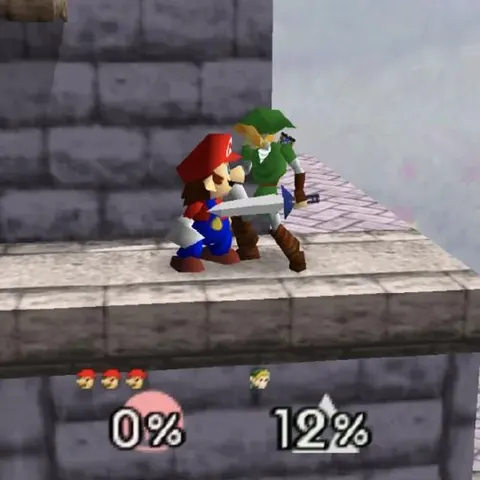
In desktop Chromium we went from Mode Select to 1P Mode → 1P Game, chose Mario and started Stage 1 against Link on the castle stage. We moved with D and landed hits with J until Link was at 12%. We also opened VS Mode and reached its character screen. Longer matches, the other modes and audio were not checked.
Super Smash Bros. is the 1999 Nintendo 64 fighting game that put Nintendo characters on one stage. The character screen in our check showed the eight starting fighters, Mario, Donkey Kong, Link, Samus, Yoshi, Kirby, Fox and Pikachu, plus four hidden slots marked with question marks.
Keyboard controls
The page maps the N64 controller to your keyboard. This list comes from the build's own controller script. We tested movement, J and Enter ourselves.
- Control stick: W, A, S, D or the arrow keys
- A button (attack, confirm): J or Ctrl
- B button (special move, back): K or Alt
- Z button (shield): L or Shift
- L and R buttons: I and O
- Start: Enter or Space
- C-up: U
- D-pad: T, F, G and H
Picking a character
On the character screen, steer the hand with W, A, S and D. The selection point sits a little below the pointing finger. Move the hand until your fighter appears in the panel at the bottom of the screen, then press J to place your token. Press Enter to start once a fighter is chosen. In our check, Mario's portrait only registered after we nudged the hand slightly down from the top of his picture.
How a match works
There is no health bar in Super Smash Bros. Each hit raises the damage percentage shown under a fighter, and the higher it climbs, the farther the next hit sends them flying. You score by knocking an opponent off the screen. 1P Game sends you through a run of stages against computer fighters, starting with three stocks on Easy in our check. VS Mode lets you set the rule to time or stock before choosing fighters.
On a phone or tablet
We have not tested touch play for this build yet. The page loads scripts for game controllers, but we have not tried a controller either.
Saving your progress
We did not check whether records or unlocked characters stay saved between visits. Until we do, assume any progress stays in this browser on this device.
More from the collection
For another one-on-one fighter, try Shadow Fight 2 or the PlayStation 3D fighter Tekken 3. Super Mario 64 is another Nintendo 64 classic, Sonic the Hedgehog is a console favorite from the same era, and GTA 3 brings Liberty City to the browser. Back to the Ported 2 Browser game list.
Player comments
Found a useful control or a way past a tricky part? Leave a note for the next player.