

How to start Motherload in your browser
Press Start on this page, then Play Here inside the game window. If a notice about mouse permissions appears first, press Ignore. A short CrazyGames video ad plays before the game, with a countdown at the bottom. When it ends, the MotherLoad title screen appears. Click NEW GAME, then close Mr. Natas's opening message with the X in its corner.
Desktop launch check · November 28, 2026
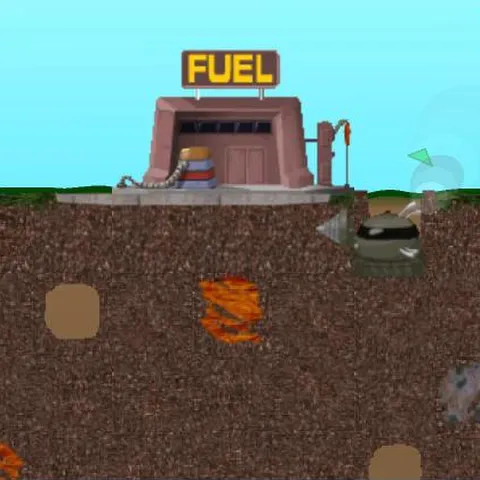
We tested in desktop Chrome on a Mac, with the game embedded on this site. The MotherLoad title (New Game, Load Game, Instructions) appeared about 20 seconds after Play Here, including the ad. After New Game and the opening transmission we were on the surface between the Fuel station and the Mineral Processing building. The Down arrow drilled the pod 12 feet into the ground and the Up arrow flew it back up. Selling ore, the shops, saving, audio and touch have not been tested. In the Claude desktop app's built-in browser, which has no WebGL on our test Mac, the game area stayed white after the ad; desktop Chrome worked.
Controls
| Action | Keys |
|---|---|
| Dig left / down / right | Left, Down, Right arrows (Down tested) or A, S, D |
| Fly up | Hold Up arrow (tested), W or the left mouse button |
| Menus | Mouse (tested) |
These come from the game's listing on CrazyGames. Click inside the game window first if the keys do nothing.
About Motherload
Motherload is a 2004 Flash game by XGen Studios, the Canadian studio behind Stick RPG and Defend Your Castle. You pilot a mining pod on Mars for a mining company run by Mr. Natas, dig for minerals, fly them back to the surface to sell, and spend the money on a stronger drill, hull, fuel tank and cargo bay. The deeper you go, the more valuable the ore and the stranger the messages from below. XGen later released Motherload Goldium Edition and the sequel Super Motherload for PC and PlayStation.
This page runs the original Flash file through Ruffle, an emulator that lets Flash games play without the old plugin.
Tips for your first dig
- Watch the Fuel gauge at the top left. If it runs dry underground, the pod is lost, so fly back up to the Fuel station before it gets low.
- Watch the Hull gauge too. Falling too far or hitting hazards damages the pod.
- Your cargo bay is small at the start. Fill it, fly up, and sell at Mineral Processing on the right.
- Dig a straight shaft down first, so the way back up is clear.
Saving
The game frame says progress is saved on this device only, and the title menu has Load Game. We have not tested saving yet. Clearing your browser data or switching to another device will start you over.
On a phone or tablet
CrazyGames lists Motherload as desktop-only, and digging needs the arrow keys. We have not tested touch play, so use a computer with a keyboard.
More from the collection
For more digging and building, try Terraria or Minecraft Web. For another classic 2D game, play Sonic the Hedgehog. Back to the Ported 2 Browser game list.
Player comments
Found a useful control or a way past a tricky part? Leave a note for the next player.