

How to start Subway Surfers in your browser
Find Subway Surfers in the Ported 2 Browser game list and press Start on this page, then Play Game in the launcher. In our test the title screen was up about 15 seconds later, showing the Subway Surfers Rome logo, the runner on the tracks and the Top Run, Me and Shop buttons. Click PRESS TO PLAY and the run begins.
Desktop launch check · November 26, 2026
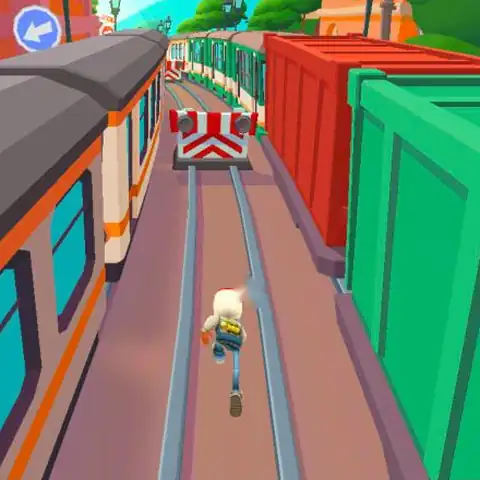
We loaded this game window inside a page on ported2browser.io in desktop Chrome on a Mac. Play Game opened the title screen, a click on PRESS TO PLAY started the run, and the score counted up as the runner raced between trams and freight cars. Up made the runner jump. We also pressed Left, Right and Down, but trains blocked the side lanes, so screenshots did not confirm every lane change. We did not test the shop, saving or touch.
About Subway Surfers
Subway Surfers is the endless runner by SYBO Games, a studio in Denmark, first released in 2012. You run along subway tracks to escape the inspector and his dog, dodging trains, barriers and tunnels. Coins pay for new characters and hoverboards, and power-ups such as the jetpack and coin magnet help a run last longer.
The game's World Tour moves the setting to a new city with each update. This web build is the Rome edition, with trams, terracotta walls and street lamps along the tracks.
Controls
| Action | Key |
|---|---|
| Jump | Up arrow |
| Roll | Down arrow |
| Move left / right | Left / Right arrow |
| Pause | Pause button at the top left |
Click inside the game window first so it receives your key presses. Up was confirmed in our test; the other arrows are the game's standard keys.
Tips for longer runs
- Stay in the middle lane when you can. It gives you room to dodge either way.
- Jump onto the roofs of parked trains. The track up there is often clearer than the ground.
- Roll under barriers with Down; jumping over them does not always clear them.
- The game speeds up the longer you run, so react early rather than at the last moment.
On a phone or tablet
Subway Surfers began as a phone game and uses swipes on touch screens, but we have not tested touch play on this site. On a computer, the arrow keys are the way to play.
Saving your progress
We did not test saving. Coins, unlocks and your best score are stored by the game in this browser, if at all; clearing site data removes them, and nothing carries over to the mobile app.
More from the collection
For another fast game about running and dodging, play Sonic the Hedgehog. For quick rounds with a different feel, try Brotato, or switch to football with Retro Bowl. Back to the Ported 2 Browser game list.
Player comments
Found a useful control or a way past a tricky part? Leave a note for the next player.