
How to start Retro Bowl in your browser
Find Retro Bowl in the Ported 2 Browser game list and press Start on this page, then Play Game in the launcher. In our test the game was ready in about 15 seconds and opened on a screen with five save slots.
- Press LOAD next to any slot. A new slot starts you as the coach of a team, in our case Buffalo.
- A short tutorial explains the home screen. Press SKIP TUTORIAL if you already know the game, or OK to follow it.
- Press DRAFT on the home screen to move on, then PLAY on the Week 1 screen.
- Click the field when it says Receive to take the opening kickoff.
Desktop launch check · November 26, 2026
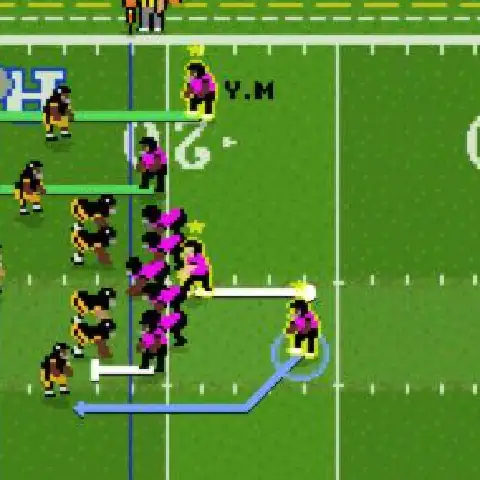
We loaded this game window inside a page on ported2browser.io in desktop Chrome on a Mac. We loaded a slot, skipped the tutorial and started the Week 1 game at Pittsburgh. The kickoff ran, our offense lined up at 1st and 10 with the passing routes drawn on the field, and a click on the field snapped the ball. Everything was done with the mouse. We did not play a full game, test saving across a reload or try touch.
About Retro Bowl
Retro Bowl is an 8-bit American football game by New Star Games, first released on iOS and Android in January 2020. New Star also publishes an official browser version.
You are the head coach and general manager. On game day you only play offense: pick a receiver, throw or run, and try to score before your drive ends. Between games you manage the team. Sign and cut players, upgrade the stadium and facilities, hire coaches, and answer the press without upsetting the fans or your players. The season ends with the playoffs and, if you get there, the Retro Bowl.
Controls
| Action | Mouse |
|---|---|
| Menus and buttons | Click |
| Receive a kickoff, snap the ball | Click the field |
| Pass | Press and drag to aim, then release |
| Dodge or dive while running | Drag in a direction (from the game's help, not tested) |
We tested clicking through the menus, receiving the kickoff and snapping the ball. For passing, dodging and kicking we followed the game's own on-screen help rather than testing every move.
Tips for a first season
- Short passes are safer than long bombs. Hit the open receiver close to you and keep the chains moving.
- Keep an eye on MORALE on the home screen. Winning, good press answers and facility upgrades keep it up.
- Spend your coaching credits on the side of the ball that is weakest. The home screen shows offense and defense ratings as stars.
- If a drive is going nowhere, a field goal is better than a turnover.
On a phone or tablet
We have not tested touch play on this site. Retro Bowl was built for phones, so its touch controls should feel natural, but this page has only been checked on desktop with a mouse.
Saving your progress
The game shows five save slots and keeps your franchise in browser storage for the game's site. In our test we started a new season in one slot; we did not reload to confirm it came back. Clearing site data removes your saves, and they do not follow you to another browser or device.
More from the collection
For another sports game, play Cricket 07. For a quick arcade game, try Subway Surfers, and for a game about building the perfect setup run by run, play Balatro. Back to the Ported 2 Browser game list.
Player comments
Found a useful control or a way past a tricky part? Leave a note for the next player.