
How to start Tekken 3 in your browser
Press Start on this page, then START GAME inside the window. The screen stays black for about 20 seconds while the PlayStation emulator and the game load. If it is still black, click once inside the window. The Namco intro and the title menu follow. Press X on ARCADE MODE, choose a fighter with the arrow keys and press X again to start Stage 1.
Desktop launch check · November 27, 2026
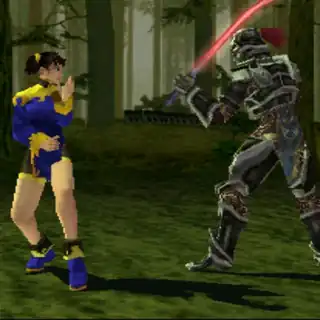
We tested in desktop Chrome on a Mac, with the game embedded on this site. After START GAME and a click inside the window, the title menu (Arcade Mode, VS Mode, Team Battle Mode, Option Mode) appeared. Down and Up moved the cursor and X opened Arcade Mode and the character select, where Right moved the cursor and X chose a fighter. We reached Stage 1, Xiaoyu against Yoshimitsu, where Right walked Xiaoyu forward and A threw attacks. Enter skipped intro screens. Audio, two-player VS, touch, controllers and saving have not been tested.
Controls
These are the emulator's default keys, read from its code. We pressed the ones marked tested.
| Button | Key |
|---|---|
| D-pad | Arrow keys (tested) |
| Cross (confirm) | X (tested) |
| Circle | Z |
| Square | S |
| Triangle | A (tested in a fight) |
| Start | Enter (tested) |
| Select | V |
| L1 / R1 | Q / E |
You can change them under Control Settings in the toolbar. In the fight, the four face buttons are the punches and kicks, so try each one to see which limb it throws.
About Tekken 3
Tekken 3 is Namco's third fighting game in the series. It reached arcades in 1997 and the PlayStation in 1998. This page runs the PlayStation version in an emulator, with Arcade Mode, VS Mode, Team Battle Mode and Option Mode on the menu.
If it will not start
- Click inside the game window to give it focus, then press a key.
- Use a current desktop browser. The emulator needs WebGL, and in the Claude desktop app's built-in browser on our test Mac it showed Failed to start game, while desktop Chrome worked.
- Reload the page if the window stays black after about a minute.
Saving
The toolbar under the game has Save State, Load State, Export Save File and Import Save File. We have not tested them, so keep an exported copy of anything you want to keep.
On a phone or tablet
We have not tested touch play. Tekken 3 needs the D-pad and four buttons together, so a computer keyboard is the safer choice.
More from the collection
For other fighters, try Super Smash Bros. or Shadow Fight 2. Another classic console game is Super Mario 64. Back to the Ported 2 Browser game list.
Player comments
Found a useful control or a way past a tricky part? Leave a note for the next player.